Image
Interordi Menu
New tool: quick crafting with FastCraft, Update by Dr. Cossack

At the request of a few players, I'm adding tonight a new crafting option within the game: FastCraft.

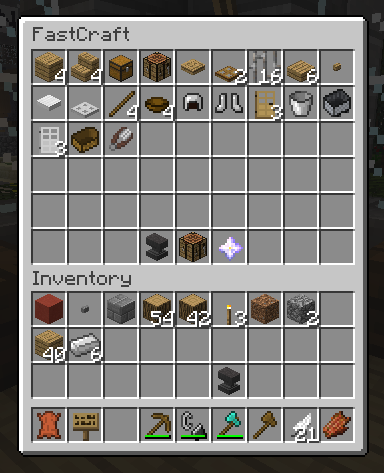
This new plugin provides you with an in-game interface displaying all of the items that can be crafted based on what you currently have in your inventory. This makes it convenient if you have large quantities of items to craft, or if you've forgotten a specific recipe!


For example, in the screenshot above, I can craft many items based on my wood and iron supplies. Clicking on any of the options offered will return the targetted item while deducting the base materials from my inventory. Note that this won't provide you wih any free items: it gives exactly the same results as regular crafting, making it easier to perform some operations.

The tool is disabled by default, so you don't need to use it if you're not interested. To turn it on, type in the following command:
/fastcraft toggle

FastCraft will then be enabled whenever you access a crafting table, and the setting will be saved between your visits. You can also click on the crafting table icon that appears to do things the normal way. To disable all of this, simply enter the same command again:
/fastcraft toggle


Comments and feedback are welcomed, as always!

Backer Coneva
Robot master
Offline
82 posts
Quote

This is gonna sound dumb- it shows a nether star at the bottom of the fast track crafting box, but you don't have one in your inv. Those can't be crafted, can they? Or is there some sort of fluke about the above screen shot?

Staff Backer Doctacosa
Admin
SciLab Official
Benevolent Dictator
Offline
6437 posts
Squid beaker
Squid beaker
Earned all 150 original CL achievements
Acquired on 17 January 2016
Unity.EXE emblem
Unity.EXE emblem
Defeat Bass.EXE in the AFD2013 event!
Acquired on 1 April 2013
Zenny
Zenny
Unlock all of the main forum features!
Acquired on 1 April 2014
Princess Celestia
Princess Celestia
Got all items in the AFD2012 event!
Acquired on 1 April 2012
Emi Ibarazaki
Emi Ibarazaki
Acquired on 1 April 2012

... and 25 more
Quote

The icons in the bottom row are tools, not items to be crafted: the anvil determines how many items are crafted at a time (left- and right-click to cycle), the crafting table brings you to the standard interface, and the Nether star updates the top display in case you edited your inventory below.

This is displayed in-game when you put your mouse cursor over the items, so it's not like you need to remember all this anyway. :)


The admin formerly known as Dr. Cossack.

Looking for me elsewhere? Maybe look at my Fediverse account for some more-or-less random postings! If you're a gamer, check out my Osmium profile. I'm building that tool!

doorgunnerjgs
Lead character
Inactive
174 posts
Quote

Awesome, will try tonight!


Exodio's Dad (Salifax's Father)

Staff Backer Masterlink
Super moderator
Minecraft op
Contributor
Yes, I'm kosher.
Offline
566 posts
Squid beaker
Squid beaker
Earned all 150 original CL achievements
Acquired on 17 January 2016
Quote

I less than three you Dawk.

<3


This my signature area... mine, yes.. so... stuff.

kagato
Contributor
Superstar!
Offline
316 posts
Squid beaker
Squid beaker
Earned all 150 original CL achievements
Acquired on 17 January 2016
100 credits
100 credits
Acquired on 1 April 2014
150 credits
150 credits
Acquired on 1 April 2014
Quote

I love you.

I used to have a mod (quickcraft) that accomplished this and it was glorious at chewing thru large volumes of resources; Unfortunately it died with 1.8. Still unsure why they've never brought the same crafting system they have with the consoles to the PC. Sure, consoles have a stiffled interface via controller vs keyboard, but still, it'd help stave off wrist issues for another year :)

Any way of implementing a shift-click to do an entire stick if mats are avail? :lol:

Edited by kagato on October 8, 2015 at 2:49:28


Chuck Norris doesn't need garbage collection because he doesn't call .Dispose(), he calls .DropKick().